When I started exploring YouTube Podcasts, I quickly realized how approachable — yet strategic — the process really is. YouTube gives creators two clear paths to bring their show to life, depending on whether you’re starting fresh or already have an established podcast. And at the heart of it all lies something surprisingly simple: the podcast playlist.
An Introduction to Podcast Playlists
On YouTube, a podcast isn’t a special video type — it’s a playlist you’ve specifically marked as a “podcast.” But that simple action unlocks a suite of features:
- A dedicated Podcasts tab on your channel (which makes your show easier to find)
- Eligibility to appear on YouTube Music, opening doors to a new audience
- Access to podcast-specific discovery tools
As a creator, that’s a huge win. It’s YouTube acknowledging the growing podcast space while keeping everything tied to your existing channel and content strategy.
Path A: Creating a New Podcast Natively on YouTube
If you’re like me and enjoy crafting every detail of your content — from thumbnail to tone — this is your path. It’s perfect for video-first creators who want full creative control.
Here’s how you do it:
- Go to YouTube Studio → click Create → New podcast.
- Choose “Create a new podcast.”
- Fill in your title, description, and visibility.
- Upload a square thumbnail (1280×1280) — think of this as your podcast’s face.
- Start uploading your episodes and add them to your new playlist.
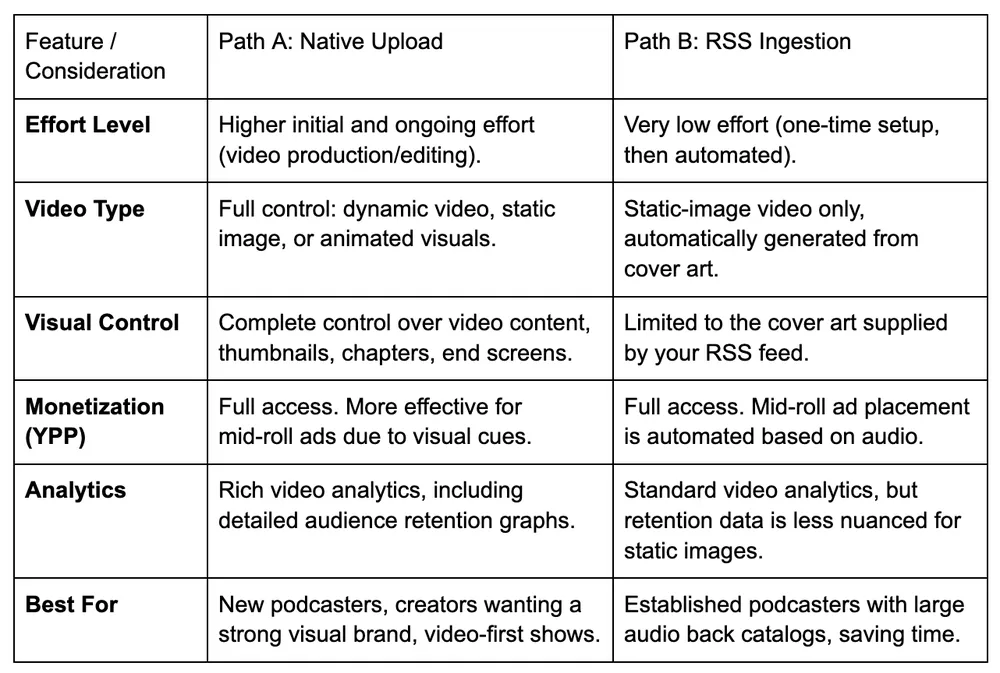
This route gives you better analytics, richer monetization options, and more control over how your podcast looks and feels.
Path B: Connecting an Existing Podcast via RSS Feed
Now, if you already have a show on Spotify, Apple, or any another platform — YouTube makes integration effortless. You can import your entire back catalogue using your public RSS feed.
Here’s what that looks like:
- In YouTube Studio, go to Create → New podcast → Submit RSS feed.
- Paste your RSS link (you’ll find it in your podcast host’s settings).
- Verify ownership via email.
- Choose which episodes to upload — all, or just new ones.
- YouTube automatically creates videos using your cover art as the visual.
And just like that, your show syncs automatically whenever a new episode goes live.
Which Path Is Right for You?
Personally, I think of these two paths as serving different creative goals.
- RSS Upload: Best if you already have a show and want quick distribution.
- Native Upload: Best if you’re building a show that thrives visually — perfect for YouTube-first creators who love storytelling and visuals.
YouTube’s strategy is clear: welcome all podcasters, while rewarding those who go the extra mile with video.
And honestly, that’s where the future of podcasting is headed — toward shows that are not just heard, but seen.